Change temperature on the display from Celsius to Fahrenheit
Issue
How to change temperature on the display from Celsius to Fahrenheit.
Applies to
- AEG 8000 Series Built-in bottom freezer fridge
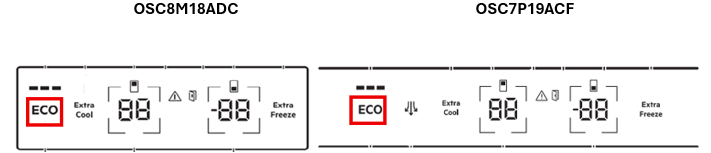
- OSC8M18ADC
- OSC7P19ACF
Solution
Using the Setting mode, you can change the temperature unit displayed on the control panel from Celsius to Fahrenheit.
To change the temperature unit
Activate Setting mode to change the temperature unit on the display
- Press and hold the ECO button for approximately 3 seconds. When the Setting mode is being activated, the display shows a blinking SE EE
- Once the Setting mode is switched on, the display shows PE On
- Tap PE repeatedly until you see CF and C (Celsius) tap the unit indicator to select between C (Celsius) and F (farneheight).
- Press and hold the ECO button for approximately 3 seconds to exit setting mode.
Note: The setting mode deactivates automatically if you do not interact with the control panel for 60 seconds.
Was this article helpful?
Related Articles
- How to install your Built-in bottom freezer fridge with top control (Video)
- Glass shelf damaged or broken glass
- Alarm Indicator is on and dE on is on the display
- My fridge-freezer’s door is difficult to open
- How to turn off ‘open door alarm’
- How to Clean & Care for your Quad Door Fridge
- How to use the Function settings of the LED display
- How to install your Quad Door Fridge (Video)
- How to set Rapid Cooling in fridge compartment
- Display shows ECO indicator and Sb or 5b on the display
Related Articles
- How to install your Built-in bottom freezer fridge with top control (Video)
- Glass shelf damaged or broken glass
- Alarm Indicator is on and dE on is on the display
- My fridge-freezer’s door is difficult to open
- How to turn off ‘open door alarm’
- How to Clean & Care for your Quad Door Fridge
- How to use the Function settings of the LED display
- How to install your Quad Door Fridge (Video)
- How to set Rapid Cooling in fridge compartment
- Display shows ECO indicator and Sb or 5b on the display