How to use the Function settings of the LED display
Issue
How to use the Function settings of the LED display
Applies to
- Quad Door fridge
- AQE5300BA
Solution
LED Display Panel
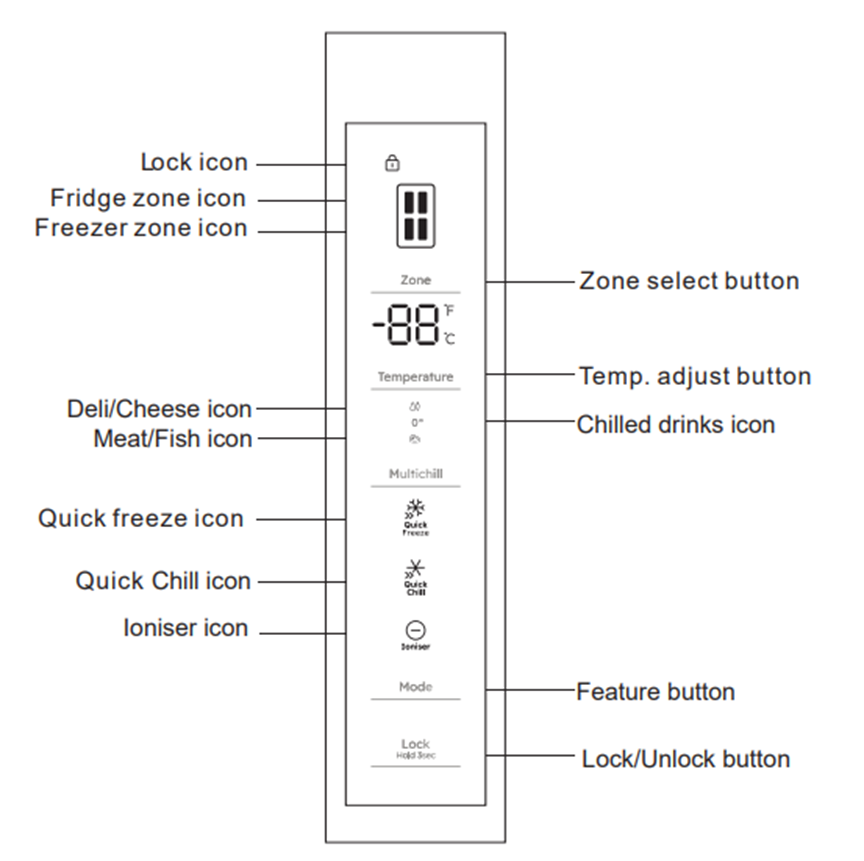
Function settings of the LED display
Note: Upon startup for the first time, the screen will display respective set temperature values.
Temperature of the fridge section is set to 4°C
Temperature of the freezer is set to -18°C
The Variable temperature drawer will run at -2°C - the Meat/Fish icon turn on.
The Ioniser function activated.
The display will turn off after 20 seconds of inactivity, while the display will wake up if the button is touched again.
Feature Selection
Each press of the "Mode" button will cycle through the operating modes.
loniser Mode
Press and hold the "Mode" button for 3 seconds to turn the ioniser function on/off.
When the ioniser function is activated, the Ioniser icon will light up.
The ION FRESHERAIR eliminates up to 99.8% of bacteria in the refrigerator.
It releases negative ions into the air which break down proteins on the bacteria surface to deliver more hygienic food storage conditions.
When the ioniser function is turned off, the Ioniser icon will turn off exiting the Ioniser mode.
Quick Freeze mode
When the super freezer mode is selected, the compressor will operate continuously to freeze foods faster and keep them fresh.
The super freezer mode will automatically turn off either after 24 hours of operation, or when the freezer reaches -28°C.
The super freezer icon will turn off, and the freezer will continue to operate at the normal set temperature.
Quick Chill Icon
When the Quick Chill mode is selected, the fridge compartment reaches the set temperature in the shortest period, in order to keep the food as fresh as possible.
In Quik Chill mode, the set temperature of the fridge compartment locks on 2°C.
The program runs 150mins then exits automatically. The Quick Chill icon goes out, and the Quick Chill function is disabled.
The set temperature returns to the last one before the Quick Chill mode operates.
Set Temperature
Freezer compartment settings
The default temperature of the freezer is -18°c.
To change the temperature, press the "Zone" button, when the freezer zone icon is flash, then press "Temperature" to adjust the freezer zone temperatures.
The freezer zone temperature setting range: -15°C~-23°C
Fridge compartment settings-
The default temperature of the refrigerator is 4°c.
To change the temperature, press the "Zone" button, when the fridge zone icon is flash, then press "Temperature" to adjust the fridge zone temperature.
The fridge zone temperature setting range: 2°C~8°C
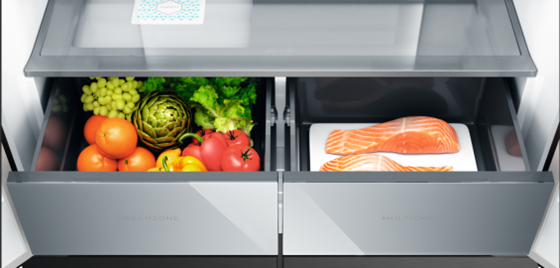
Multi Chill
Enjoy precise and versatile food storage with the Multichill compartment
Tailor this dedicated fridge space to your specific needs by choosing from three customizable temperature settings.
ExtraChill at -2°c keeps meat and fish fresher without freezing.
Set it to 0°c for perfectly chilled drinks.
Set it to 3°c to store deli meats and cheese at an optimal temperature
Was this article helpful?
Related Articles
- How to install your Built-in bottom freezer fridge with top control (Video)
- Glass shelf damaged or broken glass
- Alarm Indicator is on and dE on is on the display
- My fridge-freezer’s door is difficult to open
- How to turn off ‘open door alarm’
- How to Clean & Care for your Quad Door Fridge
- How to install your Quad Door Fridge (Video)
- How to set Rapid Cooling in fridge compartment
- Change temperature on the display from Celsius to Fahrenheit
- Display shows ECO indicator and Sb or 5b on the display
Related Articles
- How to install your Built-in bottom freezer fridge with top control (Video)
- Glass shelf damaged or broken glass
- Alarm Indicator is on and dE on is on the display
- My fridge-freezer’s door is difficult to open
- How to turn off ‘open door alarm’
- How to Clean & Care for your Quad Door Fridge
- How to install your Quad Door Fridge (Video)
- How to set Rapid Cooling in fridge compartment
- Change temperature on the display from Celsius to Fahrenheit
- Display shows ECO indicator and Sb or 5b on the display