GreenZone drawer removal and cleaning
Issue
GreenZone drawer removal and cleaning instruction.
Applies to
- Greenzone drawer removal and cleaning
- OSC7P19ACF
Solution
It is recommended to empty the drawer before removing it from the refrigerator
To remove the drawer:
Pull out the drawer from the refrigerator extending the rails fully.
Push the rails cap and lift up the front of the drawer.
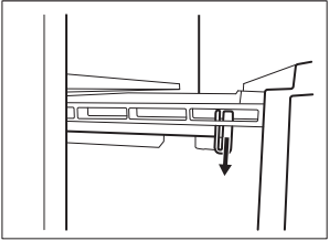
Pull the drawer out while lifting it up and detach it from the rails.
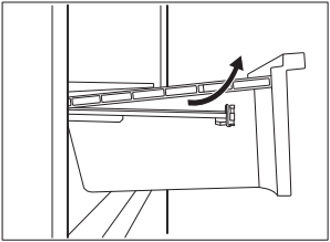
To reassemble
Pull out the rails completely.
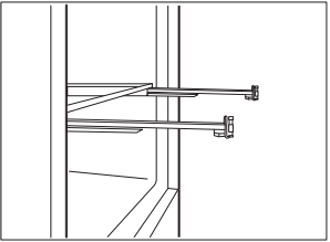
Place the rear part of the drawer on the rails.
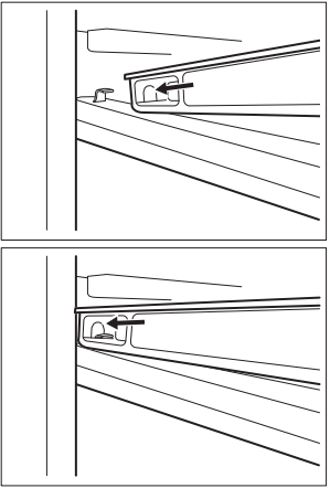
Keep the front of the drawer lifted while pushing the drawer in.
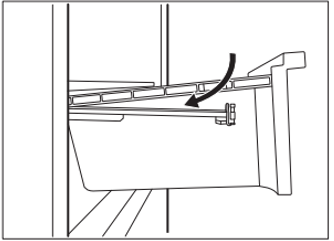
Press the front part of the drawer downwards.
Pull out the drawer again and check if it is placed correctly on both rear and front hooks.
To remove the glass cover of the GreenZone drawer
Unlock lateral gripping from both sides simultaneously.
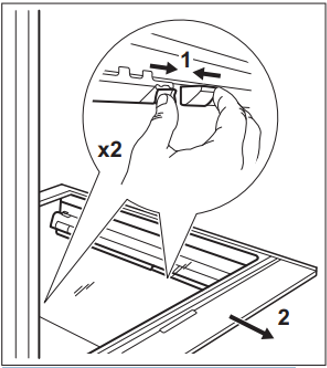
Pull the glass shelf support towards yourself.
Was this article helpful?
Related Articles
- How to install your Built-in bottom freezer fridge with top control (Video)
- Glass shelf damaged or broken glass
- Alarm Indicator is on and dE on is on the display
- My fridge-freezer’s door is difficult to open
- How to turn off ‘open door alarm’
- How to Clean & Care for your Quad Door Fridge
- How to use the Function settings of the LED display
- How to install your Quad Door Fridge (Video)
- How to set Rapid Cooling in fridge compartment
- Change temperature on the display from Celsius to Fahrenheit
Related Articles
- How to install your Built-in bottom freezer fridge with top control (Video)
- Glass shelf damaged or broken glass
- Alarm Indicator is on and dE on is on the display
- My fridge-freezer’s door is difficult to open
- How to turn off ‘open door alarm’
- How to Clean & Care for your Quad Door Fridge
- How to use the Function settings of the LED display
- How to install your Quad Door Fridge (Video)
- How to set Rapid Cooling in fridge compartment
- Change temperature on the display from Celsius to Fahrenheit