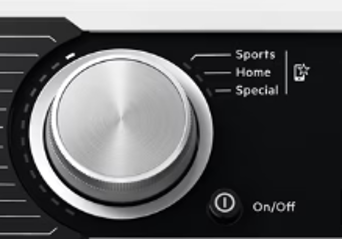
Cannot activate sports, home or special functions listed on the control panel
Issue
Applies to
- Front Load Waser
- Front Load Washer Dryer
- Heat pump Dryer
Solution
Favourite programs
These selector positions are available after the appliance has been connected to Wi-Fi.
The favourite programs can be set up and saved via App only, choosing from the available ones which are divided into the three categories indicated on the control panel.
Once the favourite programs have been set, you can select one of them via App or by turning the program dial to relevant position: the relevant led comes on and the information on the display is updated accordingly.
AEG App and additional hidden programs
AEG App provides you with a wide choice of additional hidden programs. Connect the appliance to AEG App and you will be able to choose the program that suits your needs most. You can also memorize any of the hidden cycles in the favourite program positions.
Front Load Washer & Washer Dryer – additional programs

Heat Pump Dryer – additional programs

Note: Program names are subject to change depending on market requirements without notice. In the App you can find a complete description of each program.
Was this article helpful?
Related Articles
- The washing cycle is shorter / longer than indicated on the display
- Drying Rack – How to install and use drying rack program
- Washing machine displays padlock or LOC
- Washing machine or Dryer displays error E90, E91
- Front Load washer displays error ECE
- Clothes are still damp at the end of the drying cycle
- Tumble dryer does not start / does not work
- How to reset Wi-Fi network settings on my Laundry Product
- Grey Marks on Clothes After Washing? Causes and Fixes
- The door of the washing machine cannot be opened
Related Articles
- The washing cycle is shorter / longer than indicated on the display
- Drying Rack – How to install and use drying rack program
- Washing machine displays padlock or LOC
- Washing machine or Dryer displays error E90, E91
- Front Load washer displays error ECE
- Clothes are still damp at the end of the drying cycle
- Tumble dryer does not start / does not work
- How to reset Wi-Fi network settings on my Laundry Product
- Grey Marks on Clothes After Washing? Causes and Fixes
- The door of the washing machine cannot be opened