How to cook with your AEG TotalFlex Induction Hob
Issue
- How to cook with your AEG TotalFlex Induction Hob
Applies to
- TotalFlex Induction Hob
Solution
The Electrolux TotalFlex induction hob automatically detects cookware of various shapes and sizes and creates a dedicated cooking zone for them.
Setting the cooking zone
The hob automatically determines the mode based on the cookware's size and shape. This is done with the help of 8-12 small triangular-shaped zones activated to match the cookware's surface. The number of triangles depends on the size of your hob.
1. Small zone – one triangular zone
2. Standard zone – two triangular zones combined
3. Large zone – several triangular zones combined together
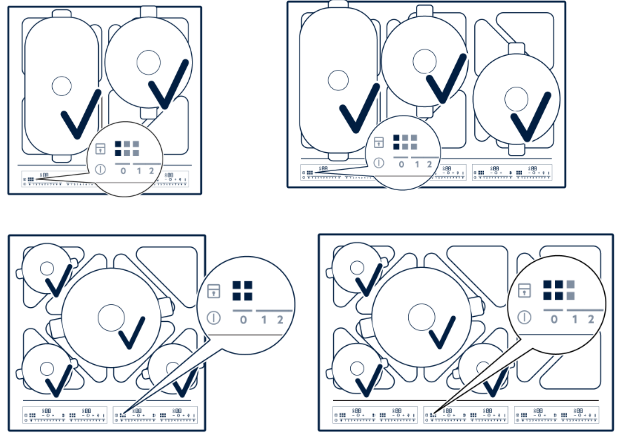
4. Multiple size zones – a combination of small, standard and large zones used simultaneously
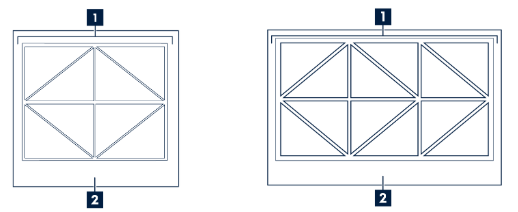
Option 1: Small zone
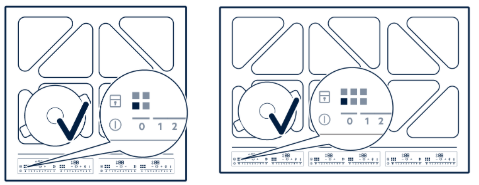
Place smaller cookware with a bottom diameter between 100 mm and 160 mm centrally on a single triangle.
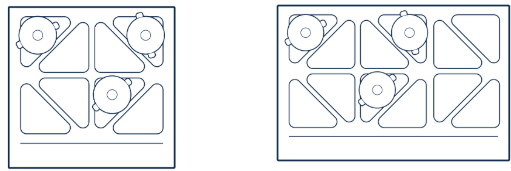
When you place your cookware on a zone, the corresponding slider control lights up
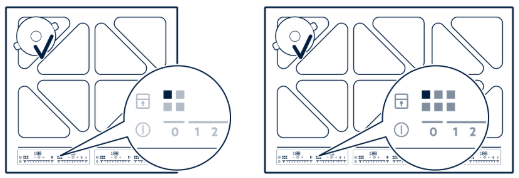
Option 2: Standard zone
Place medium-sized cookware with a bottom diameter between 160 mm and 210 mm on a pair of triangles. Depending on your hob size:
- 60 cm: up to 4 medium-sized pans (160‐210mm) can be heated at the same time
- 80 cm: up to 6 medium-sized pans (160-210mm) can be heated at the same time
When you place your cookware on a zone, the corresponding slider control lights up.
Option 3: Large zone
Place larger round cookware with a bottom diameter between 240 mm and 350 mm on four triangles.
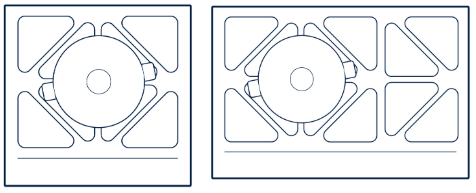
When you place your cookware on a zone, the corresponding slider control lights up.
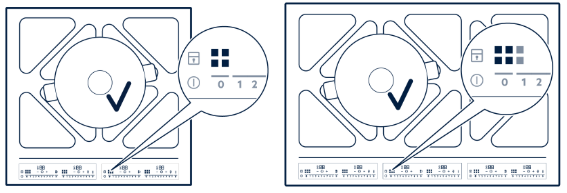
Important: If you have an 80 cm hob, only the area on the left side will link to create the large cooking area.
Place oval-shaped or extra-long cookware, e.g., roasting tins or plancha grills, vertically or horizontally in Bridge combinations. Some cookware might be too long to position vertically and use safely, as they will cover the user interface. In this case, only place the pan horizontally.
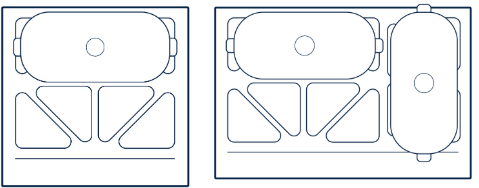
When you place your cookware on a zone, the corresponding slider control lights up.
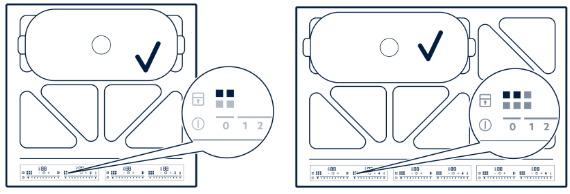
Important: The cookware must cover 3 or 4 triangles.
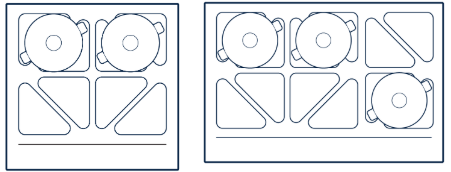
Option 4: Multiple size zones
Use a combination of small, standard and large zone simultaneously. When you place your cookware on a zone, the corresponding slider control lights up.
Was this article helpful?
Related Articles
- Oven displays error F101 or F102
- The Hob2Hood function does not work with the cooker hood
- Error F E6 or E7 on AEG electronic gas on glass hob and will not ignite
- Discoloured marks or bubbles ceramic glass cleaning tips
- Cleaning reminder displays even after cleaning
- Stains or marks on SaphirMatt cooktop – Cleaning advice
- Carbon Filters How often should you replace them
- Hob displays message A
- Oven Child Lock - Turning On and Off AEG
- Cleaning Oven Door - Video
Related Articles
- Oven displays error F101 or F102
- The Hob2Hood function does not work with the cooker hood
- Error F E6 or E7 on AEG electronic gas on glass hob and will not ignite
- Discoloured marks or bubbles ceramic glass cleaning tips
- Cleaning reminder displays even after cleaning
- Stains or marks on SaphirMatt cooktop – Cleaning advice
- Carbon Filters How often should you replace them
- Hob displays message A
- Oven Child Lock - Turning On and Off AEG
- Cleaning Oven Door - Video