How to use the SenseFry function on your AEG Induction cooktop
Issue
- How to use the SenseFry function on your Induction cooktop
Applies to
- Induction Cooktop
Solution
This function lets you set a heat setting level to fry your food. The hob keeps the selected temperature automatically while frying. Once the heat setting level is set, no manual temperature adjustment is necessary.
Hints and Tips for Sensefry function
To achieve the best results with the function:
- The SenseFry function can be used on the left cooking zones.
- Start the function when the hob is cold (no manual heat up of the cookware is necessary).
- Use cookware made of stainless steel with sandwich bottom.
- Do not use cookware with embossment at the centre of the bottom.
Examples of cooking applications for the function
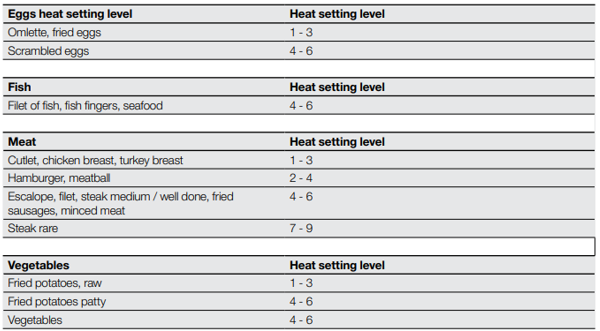
The data in the tables shows examples of food for each heat setting level. The amount, thickness, quality and temperature ( i.e. frozen ) of the food have an influence on the correct heat setting level.
Choose the heat setting level and adjustment that are the best for your cooking habits and pans.
Was this article helpful?
Related Articles
- Oven displays error F101 or F102
- The Hob2Hood function does not work with the cooker hood
- Error F E6 or E7 on AEG electronic gas on glass hob and will not ignite
- Discoloured marks or bubbles ceramic glass cleaning tips
- Cleaning reminder displays even after cleaning
- Stains or marks on SaphirMatt cooktop – Cleaning advice
- Carbon Filters How often should you replace them
- Hob displays message A
- Oven Child Lock - Turning On and Off AEG
- Cleaning Oven Door - Video
Related Articles
- Oven displays error F101 or F102
- The Hob2Hood function does not work with the cooker hood
- Error F E6 or E7 on AEG electronic gas on glass hob and will not ignite
- Discoloured marks or bubbles ceramic glass cleaning tips
- Cleaning reminder displays even after cleaning
- Stains or marks on SaphirMatt cooktop – Cleaning advice
- Carbon Filters How often should you replace them
- Hob displays message A
- Oven Child Lock - Turning On and Off AEG
- Cleaning Oven Door - Video