Oven displays error message “REMOVE FOOD PROBE”
Issue
Error message “REMOVE FOOD PROBE” after connecting Food Sensor/probe to appliance
Applies to
- Built-In Oven
Solution
“REMOVE FOOD PROBE”
If you have selected a function that is not compatible with the Food Probe, you will see this message.
- Select a setting compatible with food probe cooking.
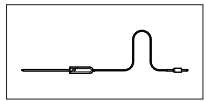
NOTE: The Food Probe will only work for the following functions
• Fan cooking
• Steam cooking (selected models only)
• Traditional bake
• Fan assist bake
• Roast
Refer to the product user manual instruction for food probe functions.
Was this article helpful?
Related Articles
- Oven displays error F101 or F102
- The Hob2Hood function does not work with the cooker hood
- Error F E6 or E7 on AEG electronic gas on glass hob and will not ignite
- Discoloured marks or bubbles ceramic glass cleaning tips
- Cleaning reminder displays even after cleaning
- Stains or marks on SaphirMatt cooktop – Cleaning advice
- Carbon Filters How often should you replace them
- Hob displays message A
- Oven Child Lock - Turning On and Off AEG
- Cleaning Oven Door - Video
In Warranty Service & Repair
Need to arrange a repair technician visit? Repairs under warranty are free of charge and we are here to support you after your warranty has expired. Authorised Technicians and genuine parts for complete peace of mind.
Related Articles
- Oven displays error F101 or F102
- The Hob2Hood function does not work with the cooker hood
- Error F E6 or E7 on AEG electronic gas on glass hob and will not ignite
- Discoloured marks or bubbles ceramic glass cleaning tips
- Cleaning reminder displays even after cleaning
- Stains or marks on SaphirMatt cooktop – Cleaning advice
- Carbon Filters How often should you replace them
- Hob displays message A
- Oven Child Lock - Turning On and Off AEG
- Cleaning Oven Door - Video