SenseBoil - F 2 or F 3 on the display, indicators blink or function does not start
Issue
- F and 2 appear simultaneously
- F and 3 appear simultaneously
- Cannot activate the SenseBoil® function
- SenseBoil® indicators blink
- SenseBoil® function does not work
- How to use the SenseBoil® function?
Applies to
- Induction Cooktop
Solution
SenseBoil® function adjusts the heat setting level automatically so that water does not boil over once it reaches the boiling point
F and 2 on the display
- Avoid using the function with liquids other than water.
F and 3 on the display
- There is too much or too little water in the pot
- You boiled some food other than water and potatoes
- Only boil water and potatoes with the use of SenseBoil®
Cannot activate the SenseBoil® function
- Make sure the surface of the hob is dry.
- If you do not place a pot on any of the cooking zones within 5 seconds, the function deactivates automatically.
- The function does not work with non-stick cookware and may not work properly with cast iron cookware.
SenseBoil® indicators blink and you hear a beeping sound
- Choose a free cooking zone without any residual heat. If there is residual heat on the cooking you want to use, the function does not start.
- If all cooking zones are already in use or there is some residual heat on all of them, the hob emits a beep sound, the SenseBoil® indicators blink and the function does not start. Finish your previous cooking activities and choose a free cooking zone without any residual heat.
SenseBoil® function does not work
- If you activate pause or remove the pot the function deactivates automatically.
- If you set count down timer on one of the cooking zones and the set time runs out before the boiling point is reached the function deactivates automatically.
Hints & Tips for SenseBoil®
- The function is best suited for boiling water and cooking potatoes.
- The function may not work properly for kettles and stovetop espresso pots.
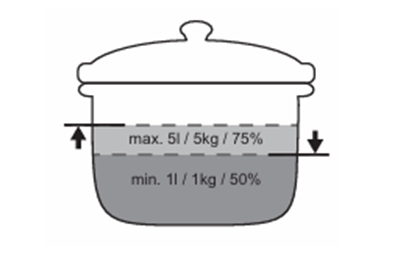
- Fill between half to three quarters of the pot with cold tap water leaving 4 cm from the rim of the pot empty. Do not use less than 1 or more than 5 litres of water. Make sure the total weight of the water (or the water and potatoes) ranges between 1-5 kg.
- To achieve the best results, cook only whole, unpeeled, medium-sized potatoes. Make sure you do not pack potatoes too tightly.
- Avoid producing external vibrations (e.g. from using a blender or placing a mobile phone next to the hob) when the function is running.
- Depending on the type of food and cookware you can adjust the heat setting after the boiling point has been reached.
- Add salt once the boiling point has been reached.
- Use a lid to save energy.
Was this article helpful?
Related Articles
- Oven displays error F101 or F102
- The Hob2Hood function does not work with the cooker hood
- Error F E6 or E7 on AEG electronic gas on glass hob and will not ignite
- Discoloured marks or bubbles ceramic glass cleaning tips
- Cleaning reminder displays even after cleaning
- Stains or marks on SaphirMatt cooktop – Cleaning advice
- Carbon Filters How often should you replace them
- Hob displays message A
- Oven Child Lock - Turning On and Off AEG
- Cleaning Oven Door - Video
Related Articles
- Oven displays error F101 or F102
- The Hob2Hood function does not work with the cooker hood
- Error F E6 or E7 on AEG electronic gas on glass hob and will not ignite
- Discoloured marks or bubbles ceramic glass cleaning tips
- Cleaning reminder displays even after cleaning
- Stains or marks on SaphirMatt cooktop – Cleaning advice
- Carbon Filters How often should you replace them
- Hob displays message A
- Oven Child Lock - Turning On and Off AEG
- Cleaning Oven Door - Video