Induction Cooktop switched itself off
Issue
Cooktop Troubleshooting tips if there is a problem.
Applies to
- Induction Cooktop
Solution
The appliance will automatically switch off if:
- All cooking zones are deactivated (0)
- You do not set the heat setting after you activate the appliance.
- You spill something or put something on the control panel for more than 10 seconds (a pan, a cloth, etc). An acoustic signal will sound and the appliance will switch off. Remove the object or clean the control panel.
- The appliance becomes too hot (eg. when a saucepan boils dry). Before you use the appliance again, wait for the cooking zone to cool down.
- You use incorrect cookware. The F symbol will come on and the cooking zone will deactivate automatically after 2 minutes.
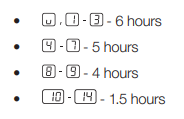
- A cooking zone is on for an extreme length of time. The - symbol will show and the appliance will switch off. See below.
- The length of time that various settings can run for before automatic switch off occurs are shown below
NOTE: When you use cookware larger than 180mm the manufacturer recommends that you put it on the rear cooking zones to maintain distance between the pot base and the user interface display.
Contact an Authorized Service Centre.
If the above steps don't resolve the issue, we recommend contacting an Authorized Service Centre.
Was this article helpful?
Related Articles
- Oven displays error F101 or F102
- The Hob2Hood function does not work with the cooker hood
- Error F E6 or E7 on AEG electronic gas on glass hob and will not ignite
- Discoloured marks or bubbles ceramic glass cleaning tips
- Cleaning reminder displays even after cleaning
- Stains or marks on SaphirMatt cooktop – Cleaning advice
- Carbon Filters How often should you replace them
- Hob displays message A
- Oven Child Lock - Turning On and Off AEG
- Cleaning Oven Door - Video
Related Articles
- Oven displays error F101 or F102
- The Hob2Hood function does not work with the cooker hood
- Error F E6 or E7 on AEG electronic gas on glass hob and will not ignite
- Discoloured marks or bubbles ceramic glass cleaning tips
- Cleaning reminder displays even after cleaning
- Stains or marks on SaphirMatt cooktop – Cleaning advice
- Carbon Filters How often should you replace them
- Hob displays message A
- Oven Child Lock - Turning On and Off AEG
- Cleaning Oven Door - Video