Induction Cooktop 'timer function' Cooktop deactivates before countdown time is reached
Issue
Induction Cooktop timer function the cooktop deactivates before countdown time is reached.
Applies to
- Induction Cooktop
Solution
Eco Timer
- Whenever the countdown timer is used the heat setting will deactivate before the final countdown time is reached.
- Residual heat left in the cookware will complete the final stage of cooking and hence some energy is saved.
- The difference in the operation time depends on the heat setting level and the length of the cooking operation.
Slide Control
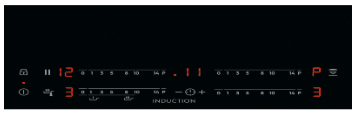
Timer - The countdown timer
Use the countdown timer to set how long you want a cooking zone to operate.
- To select the cooking zone: touch the 'timer sensor' again and again until the correct zone indicator is displayed.
- Immediately, touch the (+ ) sensor to set the time (00 - 99 minutes). When the timer indicator of the cooking zone starts to flash more slowly the time will begin to count down.
- To see the remaining time, select the cooking zone with the 'timer sensor'. The display will show the remaining time.
- To change the countdown timer: select the cooking zone with the 'timer sensor' and touch (+ ) or ( - )
- To deactivate the countdown timer, select the cooking zone with the 'timer sensor' and touch the ( - ) until the time counts down to 00. The timer indicator will go out. When the timer count down comes to an end, the cooking zone will deactivate, the 00 will flash and a beep sound will occur for 20 seconds.
- The beep sound and flashing can be deactivated immediately by touching the 'timer sensor'.
IMPORTANT! When the two timer functions operate at the same time, the display shows the count up timer first.
TFT Touchscreen
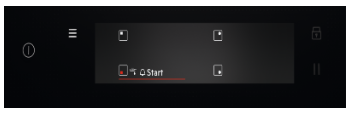
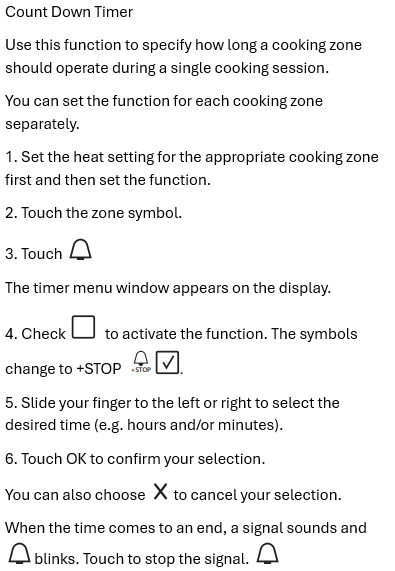
Timer - Count down Timer
Was this article helpful?
Related Articles
- Oven Child Lock - Turning On and Off AEG
- Oven displays error F101 or F102
- Cleaning Oven Door - Video
- Oven light does not work
- Oven displays error F908, F113
- Discoloured marks or bubbles ceramic glass cleaning tips
- Carbon Filters How often should you replace them
- Condensation on Rangehood surfaces
- Rangehood noise - Troubleshooting
- How to use the pizza function on your oven
Related Articles
- Oven Child Lock - Turning On and Off AEG
- Oven displays error F101 or F102
- Cleaning Oven Door - Video
- Oven light does not work
- Oven displays error F908, F113
- Discoloured marks or bubbles ceramic glass cleaning tips
- Carbon Filters How often should you replace them
- Condensation on Rangehood surfaces
- Rangehood noise - Troubleshooting
- How to use the pizza function on your oven